Prepare MT5
Use a compatible Windows desktop MT5 terminal with DirectX 11 support and a broker account. For live visualization, check that the chosen instrument has useful market depth and trade ticks.
Installation, visual layers, signal interpretation and controlled execution. A practical field guide for NEXUS_DEPTHSCAPE.
Use a compatible Windows desktop MT5 terminal with DirectX 11 support and a broker account. For live visualization, check that the chosen instrument has useful market depth and trade ticks.
Use File → Open Data Folder → MQL5 → Experts and place the delivered compiled EA/package according to its included installation instructions. Refresh Expert Advisors in Navigator or restart MT5. If you only have the .mq5 entry point, the referenced Include modules are also required to compile.
Open the intended contract chart, then attach NEXUS_DEPTHSCAPE from Navigator → Expert Advisors. Verify the instrument and whether the account is broker demo or real.
Enter the issued NXM-format key in InpLicenseKey, or leave blank only if this account is already activated. Leave InpSymbol blank to use the chart symbol; set InpStartDemo=true for synthetic exploration.
Look at the Experts log for the ready message and LIVE/DEMO and licensed status. Keep InpAutoReal=false and the execution engine disarmed during familiarization.
| Input | Default | Meaning |
|---|---|---|
InpLicenseKey | empty | Issued NXM-format key; empty only for an already activated account. |
InpSymbol | empty | Uses the chart symbol unless explicitly specified. |
InpStartDemo | false | True starts the synthetic market; no real feed required. |
InpAutoReal | false | Separate permission for real-account execution; leave false for testing. |
InpAutoMagic | 77320001 | Magic number assigned to auto-trading orders; use a deliberate unique value if running separate strategies. |
Initialization sets a 15 ms timer and listens for order-book events. This is a requested timer interval, not a guaranteed 15 ms latency or render rate. MT5 Strategy Tester is explicitly rejected by OnInit.
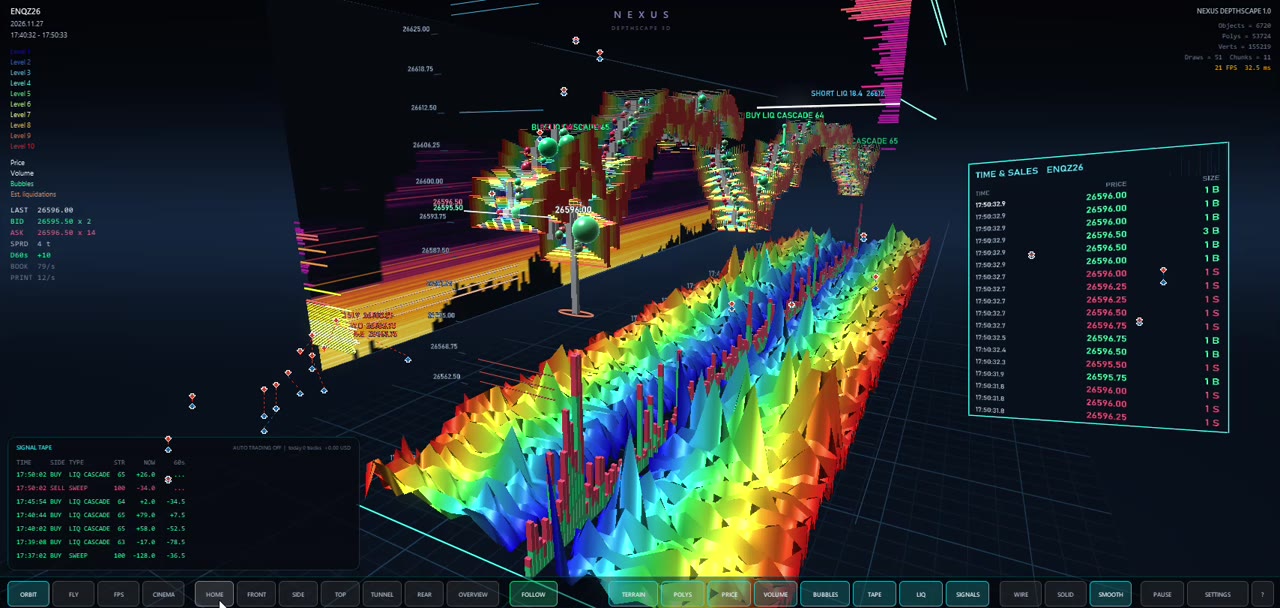
Resting liquidity is displayed intention; executed volume is actual trading activity. They answer different questions.
| Control | How to use it |
|---|---|
| TERRAIN | Resting bid/ask size across displayed depth levels and time. Compare both sides, not just the tallest peak. |
| POLYS | Price span of each displayed depth level second by second. Inspect the changing structure as price moves. |
| PRICE | Price bars / price path; relate movement to book context. |
| VOLUME | Volume bars; compare activity across time. |
| BUBBLES | 3D executed trade markers. Relate their location to the price and depth layers; do not infer exact sizing formula from the screenshot. |
| TAPE | Time & Sales wall: timestamp, price, size and displayed buy/sell classification. |
| LIQ | Estimated liquidation heatmap. Contextual estimates, not confirmed forced trades. |
| SIGNALS | Signal markers and the signal tape. Use the labels as an investigation starting point. |
| Control | How to use it |
|---|---|
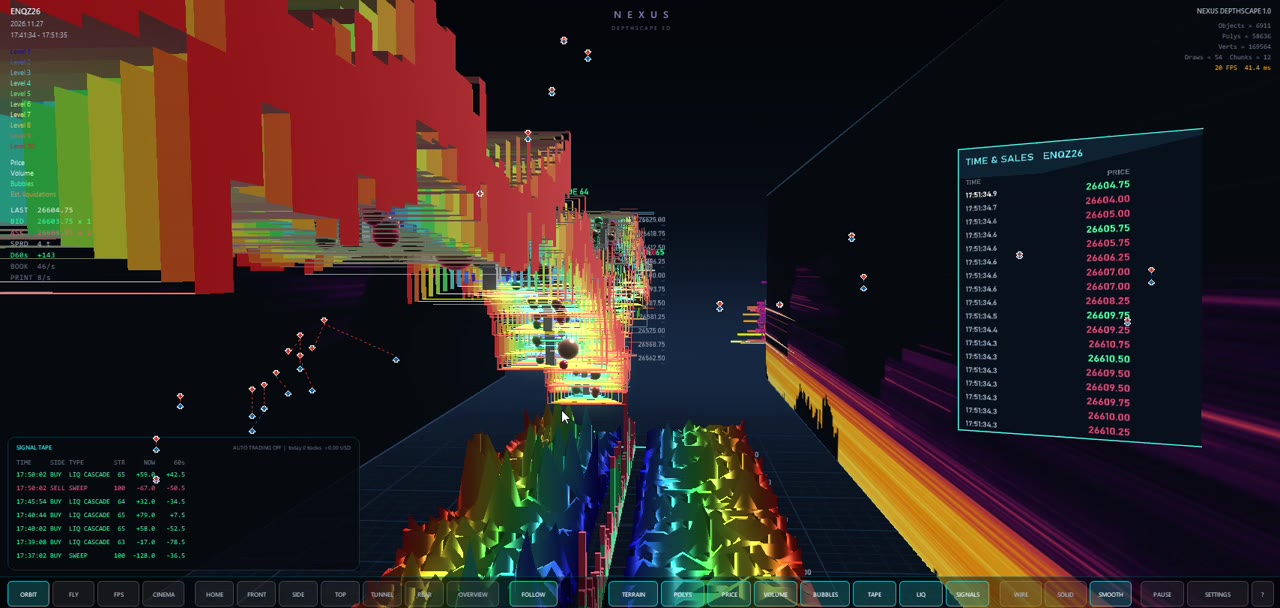
| LAST / BID / ASK | Last price and best displayed quotes; sizes appear alongside bid and ask. |
| SPRD | Displayed spread in ticks, useful for execution context. |
| D60s | Displayed 60-second delta label; exact classification and calculation depend on the underlying module. |
| BOOK / PRINT | Displayed update/print rates per second, not guaranteed data throughput. |
| Objects / Polys / Verts / FPS | Scene complexity and render performance counters; not exchange latency. |
The legend shows Levels 1–10 in the captured interface. Colors identify levels and layers; do not equate every red or blue surface with a sell or buy signal without checking the legend and viewpoint.
| Control | How to use it |
|---|---|
| ORBIT | Rotate around the scene for an overall view. |
| FLY / FPS | Explore immersive perspectives; use the on-screen help for exact movement controls. |
| CINEMA | Presentation-style viewpoint; useful for observing the scene. |
| HOME / FRONT / SIDE | Return to a reference perspective or inspect the scene from a fixed angle. |
| TOP / TUNNEL / REAR | Compare the terrain overhead, along the corridor, or from the opposite perspective. |
| OVERVIEW / FOLLOW | Use a broad view or follow the developing market; exact behavior depends on the implementation. |
| WIRE / SOLID / SMOOTH | Change how surfaces are rendered; simplify the visual scene if needed. |
| PAUSE / SETTINGS / ? | Inspect display controls, configuration and help. Pause is not a verified trading kill switch. |
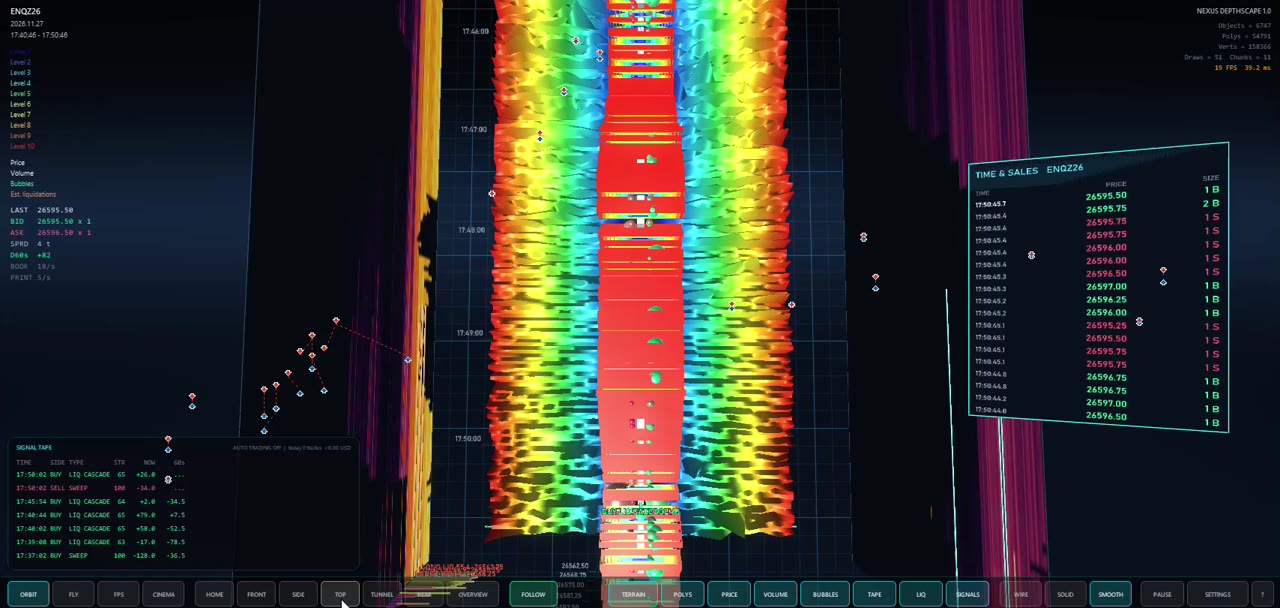
Start with Overview or Top and activate only Terrain and Price. Add Polys, Bubbles and Tape one at a time. Re-enable Signals and LIQ after understanding the scene. Exact keyboard/mouse shortcuts are not specified in the supplied source.
A signal label for a potential fast liquidity-taking event. Check whether price follows through or reverses.
A liquidity-cascade label. Examine the evolving sequence of price and depth; avoid assuming the next move is predetermined.
A liquidity-magnet label. Watch price interaction with the relevant liquidity area; it may attract, stall or reject price.
| Control | How to use it |
|---|---|
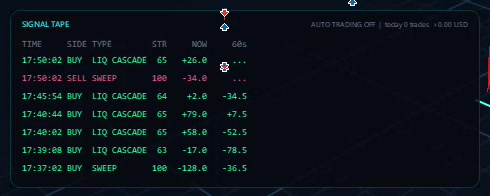
| TIME | Event timestamp. |
| SIDE | BUY or SELL event direction. |
| TYPE | Signal family, e.g. SWEEP, LIQ CASCADE, LIQ MAGNET. |
| STR | Displayed strength score; not a calibrated win probability. |
| NOW / 60s | Follow-up columns shown in the UI. Exact formula, sign convention and units require the signal module documentation; do not assume ticks or dollars. |
Observe whether buy-classified prints are followed by higher prices and changing displayed ask depth. If the move stalls, reassess; the signal alone is not an entry rule.
Observe price reaching an area highlighted by the terrain or a LIQ MAGNET label. If large flow fails to move price, consider whether the move is losing momentum, without claiming confirmed absorption.
After a LIQ CASCADE label, compare consecutive price changes, trade prints and the evolving book. A fast sequence may continue or abruptly reverse.
These are observational examples, not a strategy with proven expectancy. Use independent entry, invalidation and exit criteria; review market-data quality and execution costs.
Auto-trading is optional. The EA does not send orders through its normal visualization path, according to the supplied entry point.
Set InpStartDemo=false on a broker demo account so real market depth is available. Keep InpAutoReal=false. Verify the terminal account and symbol before any order testing.
Review actual risk, size and exit settings provided by the installed release. The available .mq5 does not expose their internal defaults, so do not assume SL/TP or risk limits are automatically configured.
Only when ready for demo execution, confirm MT5 algorithmic trading and EA permissions as needed, then perform the two-click arming in Settings. Monitor orders, positions and Experts/Journal.
Disarm using the verified execution control; check orders/positions and manage outstanding exposure manually as needed. Disabling algo trading prevents EA trade requests but does not automatically close positions.
InpAutoReal=true explicitly permits real-account execution; it does not replace arming or terminal permissions. If you choose to enable it, independently verify sizing, order behavior and risk limits. Automation can lose money.
| Symptom | Checks |
|---|---|
| No depth / empty terrain | Confirm LIVE vs synthetic mode, broker feed entitlement, instrument/session and availability of Market Depth. Try the correct active futures contract. |
| Licence rejected | Check account, key and provisioning. Read Experts log; contact the seller without sharing login credentials. |
| EA does not load | Check file placement and compiled binary. Source compilation needs ND_App.mqh and dependencies; tester mode is explicitly blocked. |
| Low FPS / complex scene | Reduce visible layers, try simpler rendering modes and close competing GPU-heavy applications. Check DX11 compatibility and scene counters. |
| No orders | Verify broker DEMO versus synthetic DEMO, arming, terminal/EA permissions and account type. Do not enable real trading to troubleshoot. |
| Unexpected order / exposure | Disarm the module, disable EA trading if needed, inspect open positions and pending orders in MT5 and manage them explicitly. Review Experts and Journal logs. |
Include MT5 build, Windows/GPU details, broker and symbol, LIVE/synthetic status, relevant screenshots, and Experts/Journal excerpts. Remove account credentials and unrelated personal data.